

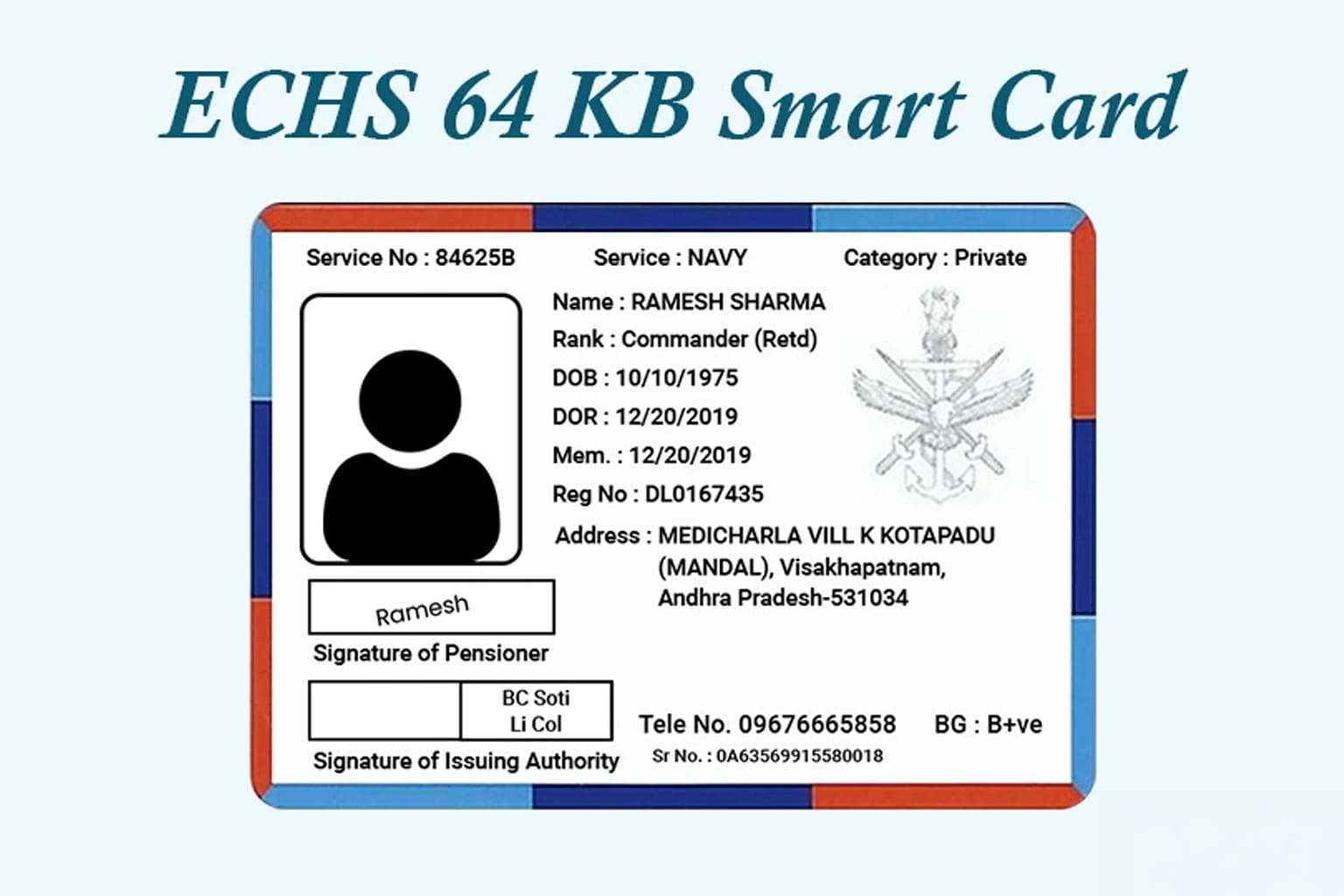
Previously, Sainik Welfare News explained the official password-recovery procedure for ex-servicemen and primary beneficiaries who had forgotten the login password for their online 64 KB ECHS smart-card application.
That guidance covered recovery through registered email and OTP, the security-question option and the alternative verification route for beneficiaries who could not use either method.
A new practical update is now available.
The official Ex-Servicemen Contributory Health Scheme website is displaying revised printing charges for fresh and replacement 64 KB smart cards. These rates are relevant to ex-servicemen, family pensioners and eligible dependants applying for a new card, replacing an older-generation card or requesting another card after losing an existing 64 KB card.
What are the revised ECHS smart-card charges?
The official ECHS portal currently displays the following rates:
| Smart-card requirement | Charge displayed by ECHS |
|---|---|
| Fresh 64 KB ECHS smart card | ₹172.50 |
| Replacement of an old 16 KB or 32 KB card | ₹129.38 |
| Replacement after loss of a 64 KB card | ₹51.75 |
These figures relate to smart-card printing or replacement. They should not be confused with treatment charges, hospital fees or a new annual ECHS membership charge.
Applicants should verify the final amount displayed on the authorised payment page before completing the transaction because portal rates and instructions may be revised later.

Which ECHS smart-card charge applies to you?
The three rates apply to different situations.
Fresh 64 KB smart card — ₹172.50
This is the displayed printing charge for a beneficiary applying for a fresh 64 KB ECHS smart card.
Replacement of an old 16 KB or 32 KB card — ₹129.38
This rate applies where an older-generation 16 KB or 32 KB card is being replaced with the newer 64 KB smart card.
Replacement of a lost 64 KB card — ₹51.75
This is the displayed charge for printing another card after an existing 64 KB ECHS card has been lost.
Applicants must select the correct application category. Choosing the wrong category may result in an incorrect payment, additional verification or processing delay.

Are these medical-treatment or membership charges?
No.
The amounts displayed by ECHS are related specifically to smart-card printing.
They should not be confused with:
- ECHS contributions applicable to eligible categories;
- hospital or medical-treatment expenses;
- medicine charges;
- annual subscription fees; or
- charges for visiting an ECHS polyclinic.
The update concerns only fresh-card printing and specified replacement situations.
Why is the 64 KB ECHS smart card important?
The ECHS smart card is an important beneficiary-identification and healthcare-access document.
It connects the approved beneficiary’s identity and entitlement with the ECHS system. It may be required while accessing authorised medical services, completing verification or managing card-related processes.
Beneficiaries should ensure that the following details remain accurate:
- name and service particulars;
- registered mobile number;
- registered email address;
- dependant information;
- pension details; and
- smart-card application status.
Outdated or incorrect contact details can create difficulty during OTP verification, password recovery or replacement-card processing.
What was covered in the earlier ECHS password-reset update?
Central Organisation ECHS issued an official password-recovery procedure dated 10 June 2026 for ex-servicemen and primary beneficiaries who had forgotten or lost access to their online 64 KB smart-card application password.
The procedure provides three recovery routes:
- Reset through registered email and OTP
- Reset through the saved security question
- Manual verification through Central Organisation ECHS or the concerned Regional Centre
How can an ECHS beneficiary reset the password through OTP?
A beneficiary can follow these steps:
- Open the official online 64 KB ECHS smart-card application portal.
- Select “Already Registered. Click to Login.”
- Enter the registered mobile number of the ex-serviceman or primary beneficiary.
- Click “Forgot Password.”
- Enter the email address already registered in the application.
- Check the registered email inbox for the OTP.
- Check the spam or junk folder if the message does not appear in the main inbox.
- Enter the OTP and create a new password.
The OTP is sent to the email address connected with the existing ECHS application. A new or unrelated email address may not work for recovery.

Can the password be reset through a security question?
Yes.
The security-question option can be used when the beneficiary remembers the answer selected during registration.
The broad process is:
- Open the ECHS smart-card application portal.
- Select the login option for registered applicants.
- Enter the registered mobile number.
- Choose “Forgot Password.”
- Open the “Using Security Question” option.
- Provide the correct answer.
- Create a new password.
This option may help beneficiaries who cannot access their registered email but remember the saved security answer.
What should you do if the OTP does not arrive?
Before raising a complaint, check:
- whether the email entered is the registered email;
- whether the registered mobile number is correct;
- the spam and junk folders;
- whether the email account is active;
- whether the inbox has enough storage; and
- whether there is a typing error.
If the OTP is still not received, the beneficiary may send a password-reset request from the registered email address.
The subject line should be:
FORGET PASSWORD
The request should mention:
- service number; and
- registered mobile number.
The issue may then be taken up with Central Organisation ECHS or the concerned Regional Centre for verification.

What if the registered email is no longer accessible?
Where the beneficiary cannot access the registered email and cannot recover the account through the security question, manual verification may be required.
The beneficiary may need to provide:
- service number;
- registered mobile number;
- password-reset request;
- Pension Payment Order copy; and
- any additional identification requested by ECHS.
The PPO copy may be required where no registered email is available for verification.
This safeguard helps prevent an unauthorised person from gaining access to a beneficiary’s smart-card application.

Why should beneficiaries keep their email and mobile number active?
The registered email and mobile number are not merely contact details.
They may be required for:
- OTP verification;
- password recovery;
- smart-card status updates;
- correction requests;
- application communication; and
- identity verification.
A beneficiary may remember the registered mobile number but still face difficulty if the email account linked with the application is no longer accessible.
Ex-servicemen and primary beneficiaries should therefore verify their registered contact details before an urgent medical need arises.
What information should be kept ready before applying?
Before beginning a fresh-card, replacement-card or password-recovery process, keep the following details available:
- service number;
- PPO number;
- registered mobile number;
- registered email address;
- security-question answer;
- existing ECHS card details;
- application number;
- identity proof, where required;
- Record Office details; and
- documents supporting the replacement request.
The exact requirement may differ according to the application category.

What should beneficiaries verify before paying the card charge?
Before making payment, check:
- whether the application is for a fresh card, old-card replacement or lost-card replacement;
- whether the correct beneficiary has been selected;
- whether the card category is accurate;
- whether personal and service details match official records;
- whether the payment page belongs to the authorised ECHS system;
- whether the final amount matches the selected category; and
- whether a payment receipt can be downloaded.
After payment, preserve:
- transaction receipt;
- application acknowledgement;
- payment reference number;
- email confirmation; and
- screenshot of the application status.
These records may be necessary if payment succeeds but the portal does not update the application.

What mistakes should ECHS beneficiaries avoid?
Do not use unofficial payment links.
Complete card-related payments only through the authorised ECHS application system.
Do not share your OTP or password.
A genuine support process should not require a beneficiary to casually disclose the complete OTP or account password to an unknown caller.
Do not submit repeated applications unnecessarily.
Multiple applications using different contact details may complicate verification.
Do not use an inaccessible email address.
The email used in the application may later be required for OTP-based password recovery.
Do not assume ₹51.75 applies to every replacement.
The amount is displayed specifically for replacement after loss of an existing 64 KB card.
Do not permanently hand over original documents without acknowledgement.
Provide copies where permitted and obtain a receipt if any original document is taken for verification.
What should beneficiaries do if payment is deducted but status is not updated?
Where payment has been debited but the application does not reflect it, the beneficiary should preserve:
- bank transaction reference;
- payment receipt;
- application number;
- date and time of payment;
- screenshot of the payment-status page; and
- registered mobile and email details.
The complaint should clearly explain:
- which card category was selected;
- how much was deducted;
- whether the payment page showed success or failure; and
- whether the application status changed.
Avoid making another payment immediately unless the official portal or authorised support channel confirms that a fresh transaction is required.
What are the official ECHS support channels?
The official ECHS portal displays beneficiary-assistance channels, including:
- Toll-free number: 1800 114 115
- Card-related email: echs-card@echs.gov.in
- Application and login support: echs@sourceinfosys.com
- Password-related escalation: jditechs2@echs.gov.in
Beneficiaries should verify the latest contact details on the official ECHS website before submitting a request because support information may change.
When contacting support, provide only the information required for verification. Never share passwords, complete OTPs or unnecessary sensitive documents with unknown persons.

What is genuinely new in this update?
The password-reset procedure dated 10 June 2026 was previously covered by Sainik Welfare News.
The newly useful information is the revised smart-card printing-rate display:
- ₹172.50 for a fresh 64 KB smart card;
- ₹129.38 for replacing an old 16 KB or 32 KB card; and
- ₹51.75 for replacement after loss of a 64 KB card.
Together, the two updates provide beneficiaries with a more complete practical guide.
One explains how to regain access to the online application. The other explains which printing charge may apply in different smart-card situations.
Has ECHS announced the effective date of the revised charges?
The ECHS website describes the figures as revised rates, but the short display does not provide a separate effective date alongside the three amounts.
The safest interpretation is:
These are the revised smart-card printing charges currently displayed on the official ECHS website.
Beneficiaries should verify the final amount shown on the official payment page at the time of application.
Final takeaway
ECHS beneficiaries should note two important smart-card developments.
The official website currently displays:
- ₹172.50 for a fresh 64 KB ECHS smart card;
- ₹129.38 for replacement of an old 16 KB or 32 KB card; and
- ₹51.75 for replacement after loss of a 64 KB card.
The official password-recovery procedure dated 10 June 2026 allows eligible beneficiaries to regain account access through:
- registered email and OTP;
- the security-question option; or
- manual verification through ECHS authorities.
Where no registered email is available, a PPO copy may be required.
For ex-servicemen, family pensioners and primary beneficiaries, the practical precautions are clear:
- keep the registered mobile number active;
- maintain access to the registered email;
- preserve the security-question answer;
- select the correct smart-card category;
- verify the final amount before payment;
- save every transaction receipt; and
- use only official ECHS channels.
A small error in the registered contact details, application category or payment process can delay access to an important healthcare document. Checking the records early is far easier than trying to correct them during a medical emergency.
Frequently asked questions
What is the charge for a fresh 64 KB ECHS smart card?
The official ECHS website currently displays a printing charge of ₹172.50.
What is the charge for replacing an old 16 KB or 32 KB card?
The displayed charge is ₹129.38.
What is the charge for replacing a lost 64 KB card?
ECHS currently displays a printing charge of ₹51.75 for this category.
Should beneficiaries verify the charge before payment?
Yes. Check the final amount on the official payment page because portal rates and instructions may be updated.
Can an ECHS password be reset through OTP?
Yes. The OTP is sent to the email address registered with the smart-card application.
Can the password be recovered without email access?
The beneficiary may use the security-question option. If that fails, manual verification through ECHS may be required.
Is a PPO copy required for every password-reset request?
No. It may be required where no registered email is available and identity must be verified manually.
Are these charges the same as ECHS membership fees?
No. These amounts relate to smart-card printing or replacement.
What is the ECHS toll-free number?
The official portal lists 1800 114 115.
Sources:-
Official ECHS website:
https://www.echs.gov.in/
Official ECHS policy list:
https://www.echs.gov.in/stat_auto_sec
Official password-recovery policy dated 10 June 2026:
https://www.echs.gov.in/assets/policy/Policy%20on%20Forget%20Password.pdf


Leave a Reply